How to Stream Amazon Prime on Discord Without Black Screens (2025 Guide)

You hit “Go Live,” the movie starts playing, and you’re ready for the opening scene. But while the audio comes through perfectly, your friends are met with an awkward silence and a black void. Instead of a movie night, you are staring at a tech support session.
This is the dreaded black screen error when streaming Prime Video on Discord, and it happens because of High-bandwidth Digital Content Protection (HDCP). Essentially, Amazon is blocking Discord from capturing the video feed to prevent piracy.
Stream Amazon Prime on Discord
Learning how to stream Amazon Prime on Discord isn’t complicated, but it does require bypassing Amazon Prime download limits and specific digital roadblocks. Whether you are facing audio sync issues or the video feed is completely dark, this guide provides tested solutions. We have restructured our approach based on user feedback to get your stream running immediately.
Method 1: The Manual Browser Fix (Live Streaming)
If you are currently in a voice channel and need an immediate fix, this is the method you want. It involves tweaking your browser settings to disable the hardware acceleration that Prime Video relies on to “cloak” its video stream.
Step 1: Disable Hardware Acceleration
Browsers use your computer’s Graphics Processing Unit (GPU) to render video efficiently. However, this hardware layer is where the DRM (Digital Rights Management) protection lives. By disabling it, you force the browser to use software rendering, which Discord can capture easily.
When you toggle this setting, your browser screen might flicker black or freeze for a second. This is normal; it signifies the rendering engine is switching modes.
For Google Chrome / Microsoft Edge:
- Click the three vertical dots (menu) in the top right corner.
- Go to Settings > System.
- Find “Use graphics acceleration when available” and toggle it OFF.
- Crucial Step: You must click the “Relaunch” button that appears for the change to take effect.
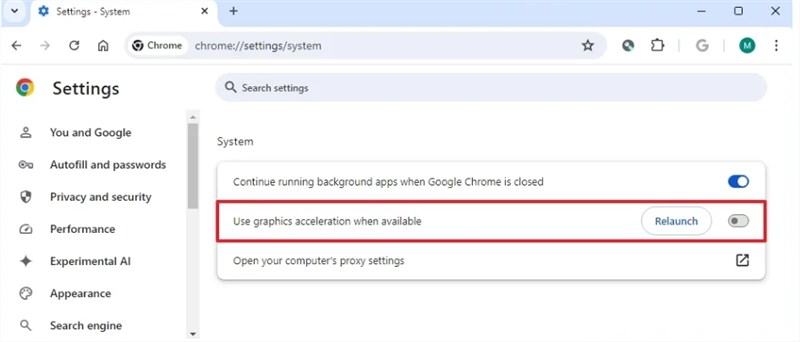
Disable Hardware Acceleration
For Mozilla Firefox:
- Click the three horizontal lines (menu) and select Settings.
- Scroll down to the Performance section.
- Uncheck “Use recommended performance settings.”
- Uncheck “Use hardware acceleration when available.”
- Restart Firefox.
Step 2: Register Your Browser as a Game
Sometimes Discord treats browsers as background processes, which de-prioritizes their video frame rate and audio capture. For the smoothest experience, force Discord to recognize your browser as a high-priority game.
- Open Discord User Settings (the gear icon near your username).
- Scroll down to Activity Privacy (or Registered Games in older versions).
- Click “Add it!” next to the text “Not seeing your game?”
- Select your browser (e.g., “Google Chrome”) from the dropdown list.
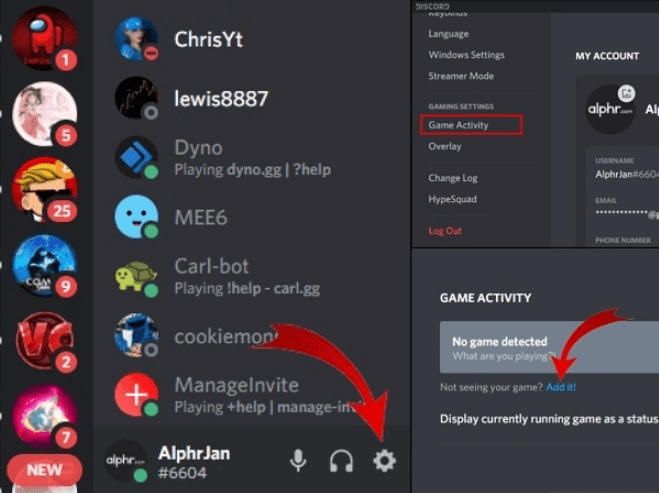
Click Add in Game Activities
If your browser does not appear in the dropdown list, it is likely “sleeping.” Go back to your browser, open a YouTube video or start the Prime movie so audio is playing, and then check the “Add it!” list again. Discord prioritizes applications that are emitting sound.
Step 3: The Critical Mistake (Applications vs. Screens)
This is the most common reason for audio not playing for viewers.
When you click “Share Your Screen” in Discord, you are presented with two tabs: Applications and Screens.
- DO NOT select “Screens”: If you share “Screen 1,” Discord tries to capture your entire desktop audio. Due to driver conflicts, this often results in video with zero sound.
- ALWAYS select “Applications”: Select the specific browser window (e.g., “Chrome – Amazon Prime Video”). This hooks directly into the process audio, ensuring your friends hear the movie clearly.
macOS Specific Instructions: Solving the Audio Gap
If you are asking, “Can I stream Prime Video from macOS on Discord?” the answer is yes, but Apple’s security protocols make it harder. Unlike Windows, macOS does not natively allow applications to record system audio without explicit permission and drivers.
1. Enable Screen Recording Permission
Before Discord can see your browser, you must grant it access to capture your screen.
- Open System Settings > Privacy & Security > Screen Recording.
- Find Discord in the list and toggle the switch to ON.
- You will be prompted to restart Discord. Do this immediately.
2. Install the Discord Audio Driver (ACE)
If your friends can see the video but cannot hear it, you are likely missing Discord’s proprietary audio routing driver (often based on Rogue Amoeba’s ACE technology).
- Join a Voice Channel.
- Click “Share Your Screen.”
- Look for a prompt at the top of the window that says “Sound may not be available on your device.”
- Click “Install” to download the audio driver.
If the prompt doesn’t appear, go to User Settings > Voice & Video > scroll to the bottom > Screen Share and look for an “Install” button under “Audio Capture.”
Method 2: The Lag-Free Offline Method (Best Quality)
While the browser method is fast, it relies heavily on your internet upload speed. If your connection fluctuates, your friends will see a pixelated, buffering mess (720p or lower).
For planned movie nights where quality matters, the “Offline Library Method” is the superior alternative. This involves using a tool like Keeprix Prime Video Downloader to save the movie as a local file first.
Why choose this method?
This is not a “hack”—it is a workflow change. By downloading Prime content, you remove the two biggest failure points: the active DRM stream and internet buffering.
- Zero Black Screens: Because you are playing a standard video file (MP4/MKV) in a media player like VLC, Discord does not detect a protected stream. The black screen issue is eliminated entirely.
- True 1080p Quality: Browser streaming compresses video heavily. A local file retains the source quality.
- No Lag: Playback does not depend on your connection to Amazon’s servers.
How to set it up:
Step 1. Download the Content: Use Keeprix Video Downloader to download the movie or episode from Prime Video to your computer.
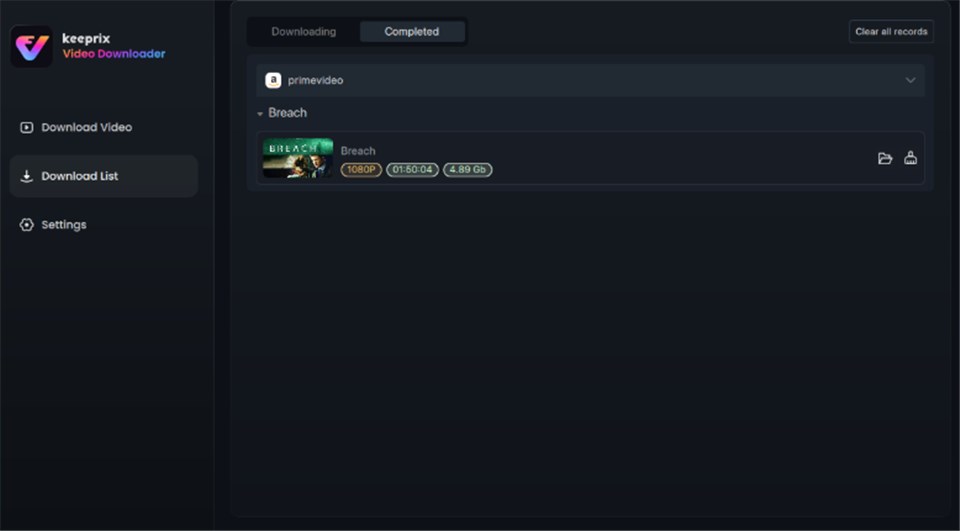
Prime Video Successfully Downloaded
Step 2. Open in Media Player: Open the file in VLC or Windows Media Player.
Step 3. Stream the Player: Go to Discord, click “Share Screen,” select the Applications tab, and choose your media player window.
This method requires preparation time to download the file, but for a host who wants to guarantee a cinema-like experience without technical hiccups, it is the most robust option.
Browser Showdown: Which Browser Works Best?
If you are sticking to Method 1, your choice of browser matters. Not all browsers handle Prime Video DRM the same way.
1. Firefox (The Top Choice)
Firefox is widely considered the best browser for streaming on Discord. It uses the Gecko rendering engine, which handles DRM decryption differently than Chromium-based browsers.
The Benefit: It is often less aggressive about blocking screen capture.
The Setup: You still should disable hardware acceleration, but Firefox offers the highest success rate for seeing video and subtitles correctly.
2. Chrome & Edge (The Standard)
These browsers are built on the Chromium engine. They have tighter integration with Widevine DRM.
The Risk: The rendering pipeline of browsers like Chrome and Edge blocks video layers very aggressively. If you forget to disable hardware acceleration, a black screen is guaranteed.
The Fix: Follow the steps in Method 1 precisely.
3. Safari (The Dead End)
On macOS, Safari utilizes OS-level HLS streaming protections that are tightly integrated with the operating system kernel.
The Verdict: Discord cannot hook into Safari’s video renderer reliably. Do not use Safari for watch parties. Switch to Chrome or Firefox on your Mac.
Understanding the ‘Why’: Prime Video HDCP
If you are wondering, “Why is Amazon Prime Video black when I stream it on Discord?” the answer lies in the digital handshake between your computer and your monitor.
When you stream a movie, Amazon uses HDCP (High-bandwidth Digital Content Protection) to ensure the video signal travels securely to your screen without being intercepted. When you use Discord Screen Share, the software essentially “intercepts” that video feed to broadcast it to your friends.
The DRM system detects this interception and reacts by severing the video layer—resulting in the black screen—while leaving the audio layer (which is less protected) intact.
Is this legal?
Can you stream Prime Video legally on Discord? Strictly speaking, broadcasting copyrighted material violates Amazon’s Terms of Service. However, most users operate under the assumption of “Fair Use” when hosting a private watch party for a small group of friends in a locked server. To stay safe:
- Keep it Private: Never stream to public Discord servers or stages.
- Non-Commercial: Never charge money for access.
- Small Groups: Limit the audience to your immediate friend circle.
Frequently Asked Questions
Q1. Why is my screen black when I stream Prime on Discord?
This is caused by hardware acceleration in your browser. The browser uses your GPU to render protected video, which blocks screen capture. Go to your browser settings and turn off “Use graphics acceleration” to fix it.
Q2. How do I fix audio not working while streaming?
90% of the time, this is because you shared your “Screen” instead of the “Application.” Stop the stream, click “Share Screen” again, click the “Applications” tab, and select specifically the browser window (e.g., Chrome).
Q3. Discord doesn’t show my browser in the “Add it!” list. What do I do?
Discord only detects active processes. If your browser is idle, it won’t show up. Open a YouTube video or play your movie for a few seconds so audio is generated, then check the “Add it!” menu again.
Q4. Can I watch in 1080p on Discord?
Only if you have Discord Nitro (which supports 1080p/60fps streaming) or if you use the Offline Method (Method 2) described above. Standard free Discord accounts are limited to 720p/30fps, which can look blurry on larger screens.
Conclusion
Technical glitches shouldn’t ruin your movie night. Whether you are dealing with the frustrating black screen error or struggling with audio sync, the solution comes down to how you choose to render the video.
For most users, Method 1 (disabling hardware acceleration in Firefox or Chrome) is the quickest way to get the show on the road. Just remember to select the “Application” window, not the “Screen,” to keep the audio flowing.
However, if you want to permanently solve how to stream Amazon Prime on Discord with zero interruptions and perfect quality, Method 2 (The Offline Method) remains the pro choice. By taking the time to download Amazon Prime videos with Keeprix Video Downloader, you regain control over your viewing experience, ensuring your next watch party is memorable for the movie, not the troubleshooting.
Download Keeprix Video Downloader free and start building your offline library today!