Is Philo Free with Amazon Prime? The 2025 Cost & Subscription Guide

Jason, a “Cost-Conscious Streamer,” recently settled onto his couch to catch a live episode of Yellowstone on the Paramount Network, which he knew was carried by Philo. He navigated to the “Live TV” tab on his Fire TV Stick, saw the show listed, and assumed his $139 annual Amazon Prime membership covered it. After all, the “Prime” logo is everywhere on the dashboard.

Is Philo Free with Amazon Prime
Instead of the show starting, he was greeted by a screen asking him to confirm a $25 monthly charge. He isn’t alone in this frustration. Millions of users believe Prime Video acts as an all-inclusive buffet. However, Amazon mixes free “Prime” perks with paid third-party add-ons in a single menu. The only difference is often a small shopping bag icon versus the “Prime” checkmark—a distinction that is nearly invisible until you click “Play.”
Facing a paywall when you are ready to relax is a significant obstacle. This guide clarifies that confusion. We tested the Prime Video channels integration across a Fire TV Stick, a web browser, and a Smart TV to give you a definitive answer on costs, how the interface differs from the real Philo app, and how to protect your wallet.
Is Philo Free with Amazon Prime?
Is Philo free with Amazon Prime? The straightforward answer is no. Philo is fully compatible with Amazon devices and integrates into the interface, but it is not included in the base Amazon Prime membership fee. Does Amazon Prime include Philo as a perk? No—it functions strictly as a paid add-on.
We verified this on a Fire TV Stick 4K. When navigating the “Live TV” row, Philo channels appear side-by-side with free channels (like Amazon’s “Freevee” news channels). However, clicking a Philo channel (like AMC or HGTV) triggers a system overlay asking you to “Start your 7-day free trial,” followed by a recurring billing notice.
There is no hidden “free tier” for Prime members.
You may also like: Is Beachbody Free with Amazon Prime >
Analyzing the Philo Subscription Amazon Prime Cost
Once you accept that it isn’t free, the pricing is standard. A Philo subscription on Amazon Prime costs $25 per month. This fee is charged to your Amazon card on file.
It is critical to distinguish between the application and the service.
- The App: You can download the Philo app onto your Fire TV or smart device for free.
- The Service: To view the content, you must pay.
Expert Insight: Amazon displays “Prime Included” movies directly next to “Subscribe to Watch” content. If you look closely at the thumbnail on your TV, “Prime” content usually has the Prime logo in the top left corner. Paid add-on content (like Philo) usually has no logo or a small dollar sign until you click it.
Philo vs. Prime Video Channels: Which is Better?
This is where most users get stuck. You have two ways to buy Philo: directly through the Philo website (using the Philo app) or as an “Amazon Channel” inside Prime Video.
For Jason, the goal was simplicity. But after testing both, we found that subscribing through Amazon comes with a major user interface (UI) penalty.
The “Clunky” Amazon Interface
When you subscribe via Amazon Channels, you must watch Philo inside the Prime Video app.
- No Grid Guide: The native Philo app offers a traditional, cable-style grid guide that makes seeing what is on next very easy. Amazon Prime Video displays live channels in a single horizontal row. You have to scroll right endlessly to find a specific channel.
- Mixed Content: Amazon mixes on-demand movies with live TV channels in the search results, making it hard to just “surf channels.”
The “Link Account” Issue
A major frustration for subscribers is the “Walled Garden.” If you subscribe to Philo through Amazon Channels, you generally cannot log in to the standalone Philo app.
We attempted to use our Amazon-billed credentials to log into the native Philo app on an iPhone and a Roku. There was no easy “Sign in with Amazon” button.
- The Limitation: Your subscription lives and dies inside the Prime Video app.
- The Fix: If you want the superior features of the Philo app (better DVR, profiles, grid guide), do not subscribe via Amazon. Subscribe directly at Philo.com, then sign into the Philo app on your Fire Stick.
- Verdict: Only choose the Amazon Channel add-on if you absolutely refuse to create a new password and want all billing on one statement. Otherwise, the direct app experience is superior.
Is It Worth It? Philo vs. The Competition
If $25 feels steep for an add-on, you might be wondering if cheaper alternatives exist. We compared Philo against two popular competitors relevant to the “Value Seeker.”
| Feature | Philo | Sling Freestream | Hulu (Basic) |
| Cost | $25 / month | $0 (Free) | $7.99 / month |
| Live TV? | Yes (70+ Channels) | Yes (FAST Channels) | No (On-Demand Only) |
| Top Channels | AMC, HGTV, History, Nickelodeon | ABC News Live, FailArmy (No Cable Majors) | None (Network shows next day) |
| Ads? | Yes (on Live TV) | Yes (Heavy Ads) | Yes |
| Verdict | Best for cheap Lifestyle/Ent. Cable. | Best for background noise/News. | Best for watching shows next-day. |
The Takeaway: If you just want something to watch, try Sling Freestream or Amazon’s own Freevee first—they are genuinely free. If you specifically need live channels like Yellowstone (Paramount) or Property Brothers (HGTV), Philo is the cheapest way to get them, even at $25.
Pro Tip: Keep What You Pay For (Offline Viewing)
If you decide to pay the $25 monthly fee, you likely want to get the most value out of it. One limit of the Amazon Channel subscription is that content expires. Shows leave the platform due to licensing deals, and Amazon downloads cannot last forever on mobile devices; often expire 48 hours after you start watching.
For users who want to archive a favorite season of a show (like Yellowstone) before it gets removed, or who want to watch offline on a laptop during a long flight without Wi-Fi, using a tool like Keeprix Prime Video Downloader is a smart “insurance policy” for your subscription.
Why Use a Downloader?
- Permanent Library: Unlike the temporary downloads inside the Prime app, Keeprix Video Downloader saves video files (MP4/MKV) to your hard drive. They never expire, even if you cancel your Philo subscription later.
- True Offline Access: Watch on any device (laptop, TV via USB) without needing an internet connection or the Prime Video app.
- Ad-Free Options: It can help remove commercial interruptions from the recorded file, making for a smoother re-watch experience.
This ensures that the money you spend on the subscription results in a media library you actually own, rather than just rent.
How to download Amazon Prime videos with Keeprix Video Downloader:
Step 1. Download Keeprix Video Downloader and install it on your computer. Launch it and select the Amazon platform.
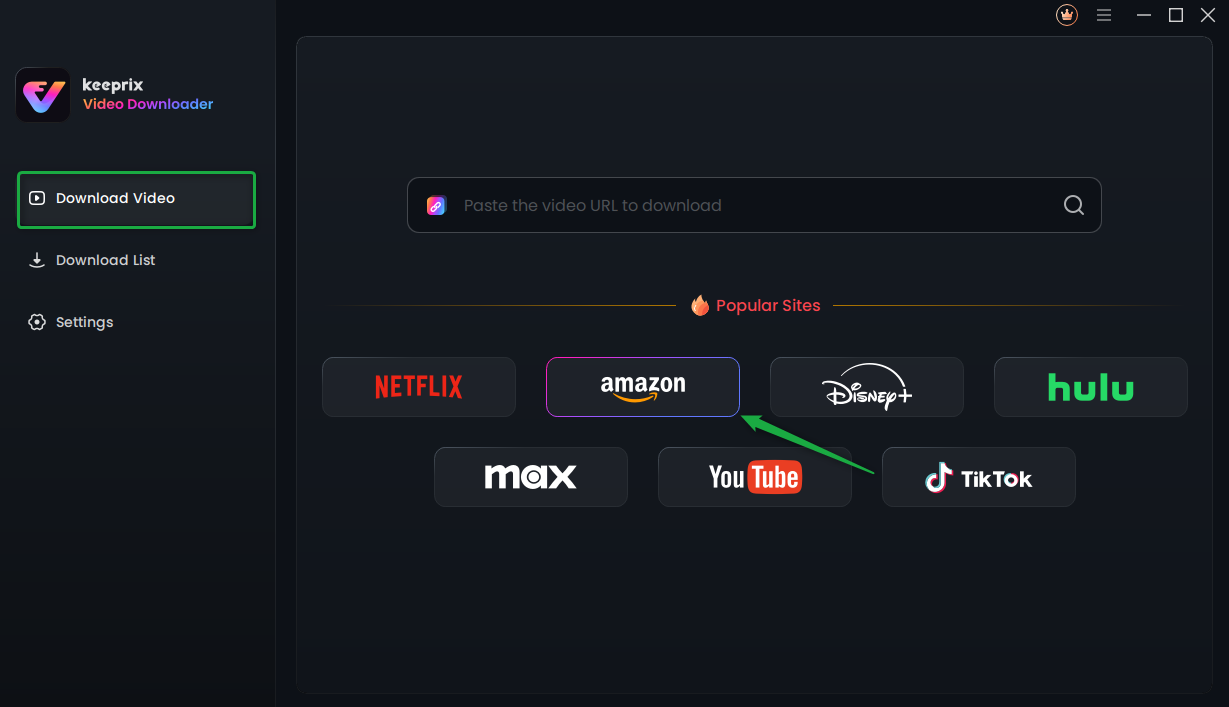
Choose Amazon Prime Platform
Step 2. Search for a video you want to download, and tap the download button.
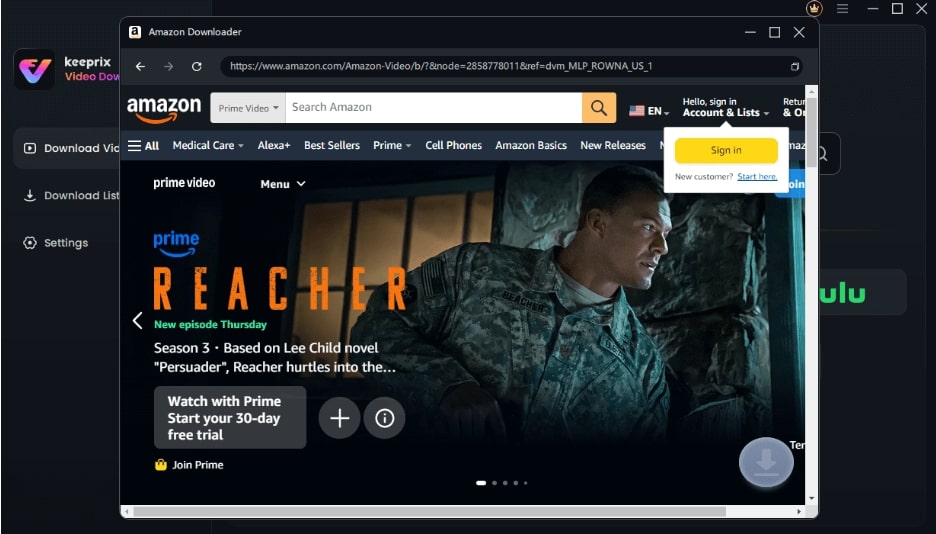
Sign Into Prime Account
Step 3. After the download is completed, the video will be stored in the local file on your computer.
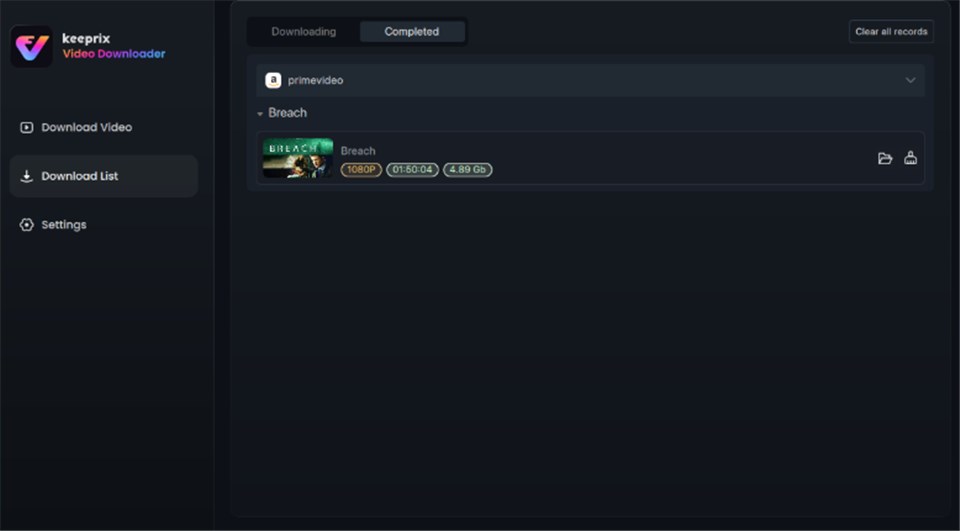
Prime Video Successfully Downloaded
How to Start (and Cancel) the Philo Free Trial on Amazon
For a “Value Seeker,” the most stressful part of testing a new service is the fear of accidental billing. You can snag a Philo free trial on Amazon, but you must know how to cancel it before the 7-day window closes.
To Start the Trial:
- Navigate to the “Live TV” or “Channels” tab on your Fire TV or Prime Video interface.
- Scroll to the Philo row.
- Click on any content (e.g., a movie on AMC).
- Select “Start your 7-day free trial” and confirm your PIN.
To Cancel (Crucial Step):
If you decide the service isn’t for you, you cannot cancel inside the Philo app because you didn’t buy it there. You must go through Amazon.
- Go to Amazon.com on a desktop or mobile browser.
- Select Account & Lists > Memberships & Subscriptions.
- Look for “Prime Video Channels.”
- Find Philo in the list and select Cancel Channel.
Warning: Do not wait until the 7th day. Amazon often processes the charge a few hours early. We recommend cancelling on day 6 if you do not intend to keep it.
Philo on Amazon Prime FAQs
Q1. Do you get Philo with Amazon Prime automatically?
No. Philo is never bundled automatically. It is a paid channel add-on.
Q2. Can I use my Amazon login on the Philo website?
Generally, no. Subscribing via Prime Video Channels keeps your access restricted to the Prime Video app. To use the Philo app/website, you should cancel the Amazon channel and subscribe directly at Philo.com.
Q3. Is Philo cheaper through Amazon?
No. The price is $25/month regardless of where you buy it. Amazon offers billing convenience, but no discount.
Q4. Does the Philo add-on have the same channels?
Yes. The channel lineup (AMC, HGTV, Discovery, etc.) is identical. Only the interface changes.
Conclusion
The confusion surrounding is Philo free with Amazon Prime is understandable. The “Prime” logo sits awkwardly close to paid content, and the interface blends them together. To be clear: Philo is a paid service ($25/month).
For the best experience, we recommend subscribing directly through Philo for the better app interface. However, if you prefer unified billing, the Amazon Channel works fine—just be aware of the clunkier menus. And if you do subscribe, consider securing your favorite content permanently with Keeprix Video Downloader. It can help you download Amazon Prime videos, ensuring that your monthly investment builds a library that lasts forever.