Amazon Prime DRM: What Is It & How to Bypass

Key Takeaways
- Amazon Prime Video DRM is a set of encryption + licensing controls designed to prevent unauthorized copying and playback of Prime Video titles on unapproved apps/devices.
- In practice, DRM means Prime downloads are “offline playable,” not “DRM-free files”—they typically expire and won’t play outside the Prime Video app.
- To bypass or remove DRM from Amazon Prime videos, you should use a third-party downloader like Keeprix.
- You should always ensure to download DRM-free videos for personal use only, or you may violate Amazon’s terms of use.
Disclaimer: This article is provided for informational and educational purposes to help users understand how Amazon Prime Video DRM works and how to use Amazon’s official offline viewing features responsibly. Any misuse of the Amazon Prime downloaded videos may violate the terms of service of content providers and could be illegal in some jurisdictions. Always follow local laws and platform rules.
When downloading a video from Amazon Prime Video, you may notice that it can be watched only inside the Prime Video app. What’s worse, even if it’s downloaded, you may need to connect to the network and watch them offline. That’s how Amazon Prime DRM works. Searching “Amazon Prime video drm removal” usually means one thing: you want offline access without the usual restrictions.
In this article, we will discuss what the DRM is on Amazon Prime Video and provide an efficient way to download unrestricted videos with a Prime Video downloader. Let’s dive in!
Prime Video DRM Removal
What Is Amazon Prime Video DRM?
DRM (Digital Rights Management) is the technology that streaming services use to control who can watch, where they can watch, and whether content can be copied. Prime Video DRM typically involves:
1. Encryption of the video stream/file
The video is delivered in an encrypted form so that a normal media player (like VLC) can’t simply open it.
2. A license system that grants playback rights
When you press Play (or try to watch a downloaded title), your app/device requests a license that says things like:
- Is this user logged in and entitled to this title?
- Is this device allowed?
- Has the rental expired?
- Is the output secure?
3. Device- and platform-specific DRM implementations
Streaming commonly relies on major DRM families such as Google Widevine, Microsoft PlayReady, and Apple FairPlay—each aligned with different device ecosystems and security models.
You may also like: How to watch Amazon Prime on TV
Why Does Prime Video Use DRM?
Top-ranking SERP pages generally agree (even when they’re trying to sell “removal” tools) that DRM is used to:
- protect licensing agreements with studios,
- prevent mass redistribution,
- enforce regional windows and subscription rules,
- manage offline downloads (expiration, device limits, etc.).
What DRM looks like for real users
If you’ve ever seen issues like:
- “HDMI not allowed,”
- playback errors after changing monitors,
- downloaded videos expiring,
- downloads only play inside the Prime Video app,
…those are all common “DRM in action” behaviors.
Can You Remove DRM and Download Videos from Amazon Prime?
The practical reality: “DRM-free” is not a supported Prime Video feature. Amazon does support offline downloads, but those downloads are meant to be consumed inside Prime Video’s apps and under Amazon’s rules (device compatibility, viewing period, etc.).
Amazon’s own usage rules describe typical limits like:
- ~30 days to begin watching after download, and
- ~48 hours to finish after you start watching (typical).
So, if by “download” you mean an ordinary MP4 file you can keep forever, that’s usually not how Prime’s official downloads work.
Is DRM removal possible?
Yes, although the official download feature doesn’t allow downloading DRM-free videos from Amazon Prime, some third-party download tools can help bypass DRM from a purely technical standpoint.
How to Download DRM-free Videos from Amazon Prime
To download Amazon Prime videos without DRM protection, you can use Keeprix Downloader. It is positioned as a convenient way to save Amazon Prime movies and TV shows for offline viewing, especially if you’re tired of common streaming pain points like expiring downloads, region-based availability changes, or being limited to playback inside the official app.
Why Choose Keeprix Downloader?
- Download streaming videos from Amazon Prime, Netflix, Disney+, and 1000+ websites.
- Remove DRM from the downloaded videos and save them to MP4 format.
- Allow downloading videos with any subscription plan, including the basic with ads one.
- No download limit on the video platforms. Save whatever you want from any website.
Steps to download Amazon Prime videos with Keeprix Downloader:
Step 1. Download and install Keeprix Downloader on your Windows or Mac computer.
Step 2. Launch the software and choose Amazon from the homepage.
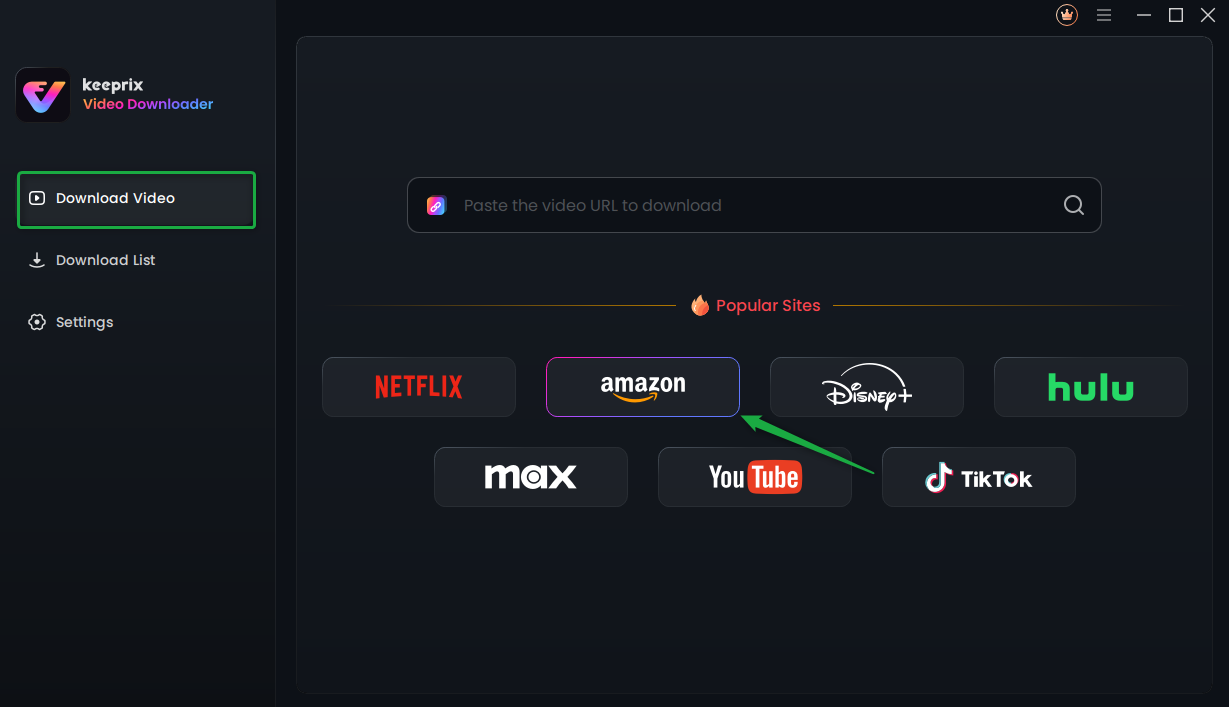
Choose Amazon Platform
Step 3. Log in to your Prime Video account. Then use the built-in browser to search for your desired movies or shows. You can also paste the URL directly.
Step 4. On the video profile page, click the download button to save the videos directly.
Is It Safe to Remove DRM from Amazon Prime Videos?
The safety concerns about removing DRM from Amazon Prime usually involve two parts: device safety and account safety.
1) Device safety (malware + privacy risk)
To ensure your device’s safety when removing DRM from Amazon Prime videos, you should always choose a trusted and clean program to install. Or you may encounter the potential risks:
- bundled installers,
- credential harvesting,
- adware/PUAs,
- hidden background services.
2) Account safety (locks, flags, ToS issues)
Even if the downloaders can provide unlimited downloads from streaming video platforms, it’s better not to download more than 100 videos in a day. This is to prevent the developer from detecting any suspicious actions of your account.
FAQs About Prime Video DRM Removal
1) Does Amazon allow DRM removal?
Amazon provides official downloads for offline viewing, but it does not present DRM removal as a permitted feature in its published usage rules. You can use some third-party tools like Keeprix to remove DRM from Amazon Prime videos.
2) Is removing DRM illegal in the US?
It can be. U.S. law (DMCA §1201) generally prohibits circumventing technological access controls, with limited exemptions created through a formal process.
3) How to bypass DRM on Amazon Prime for free?
To bypass DRM on Amazon Prime for free, you can use an open-source screen recorder like OBS to rip Prime Video without paying. However, you should always disable the hardware acceleration feature in your browser to avoid a black screen on the recorded files.
Conclusion
Amazon Prime Video DRM exists to enforce licensing and prevent unauthorized copying, which is why “Amazon Prime Video DRM removal” is not a supported feature officially. The safest way to bypass DRM on Amazon Prime videos is to use a dedicated Prime Video downloader like Keeprix. By using it and downloading Amazon Prime videos to MP4, you can create a real offline video library and watch them at any time, anywhere.