How to Download Amazon MiniTV Video: The 2025 Offline Viewing Guide

Facing a dead zone without your favorite shows can be a significant obstacle, especially during a long commute. This is the exact frustration faced by users like “Arjun,” a daily metro commuter who relies on offline content to pass the time. If you have spent the last hour searching for how to download Amazon MiniTV video content to your device, you are likely facing the same reality he did: the button simply isn’t there.
Can You Download Amazon Mini TV Video
Many users ask, “Can I download videos from Amazon MiniTV directly?” The short answer is no, not through the official app. Unlike Prime Video, the Amazon MiniTV app operates under a strictly streaming-only model. To verify the current state of Amazon MiniTV offline viewing, our technical team rigorously tested the Amazon Shopping app video interface and the standalone MiniTV app across Android 14, iOS 17, and Windows 11 desktops. In every test case, the native download option remains absent.
This guide explains why this restriction exists, clears up the confusion between Prime and MiniTV, and details the specific tools required to bypass Amazon download limits safely.
The Reality: Why You Can’t Find the Button
The limitation is particularly glaring for users who assume that because the service is owned by Amazon, it would function exactly like Prime Video. Unfortunately, MiniTV does not support offline downloads natively.
The reason is purely financial: MiniTV is an Advertising Video on Demand (AVOD) service. It is free because it serves ads. If you could save MiniTV videos offline easily, Amazon could not serve you real-time ads, which breaks their revenue model. Unlike Prime Video, where your subscription fee covers the license to download content, MiniTV relies on you being online to generate income.

Amazon MiniTV Logo
For users like Arjun, this realization is frustrating. He discovers that Mini TV content rules and DRM (Digital Rights Management) prevent him from saving web series for his metro ride. However, while the official app lacks this feature, desktop software provides a viable solution for those willing to use a computer as an intermediary step.
Why Manual Recording Fails: DRM Explained
Many users attempt to bypass download restrictions by simply screen recording the playback on their phone, only to end up with a black screen and audio only. This is not a glitch; it is a deliberate security feature.
Amazon utilizes Google’s Widevine L1 DRM (Digital Rights Management), which encrypts the video stream at the hardware level. When a screen recorder attempts to capture the display, the operating system blocks the video layer to prevent piracy. This technical barrier is why “easy” workarounds fail and why specialized software that interacts directly with the server stream is necessary for actual downloads.
The “Data Saver” Alternative: Managing A Without Downloads
Not everyone is ready to invest in professional software or manage file transfers. Returning to the story of Arjun, perhaps he decides to stream on the train but wants to ensure he doesn’t run out of data before he gets home.
If you are in this position, the best official alternative is enabling Data Saver mode. While this method does not provide a true Amazon MiniTV offline mode, it significantly reduces bandwidth consumption.
Configuring Stream Quality on Mobile
To optimize your experience on the Amazon Shopping app video player or the Mini TV phone app, follow these steps to adjust bitrate consumption:
1. Open the Amazon Shopping app and navigate to the MiniTV section.
2. Tap on the “Profile” icon or the “Settings” gear in the top right corner.
3. Select Stream Quality.
4. You will see options typically labeled as:
- Data Saver: Uses approximately 0.14 GB per hour (Ideal for commutes).
- Good: Uses approx 0.18 GB per hour.
- Best: Uses approx 1.82 GB per hour (Recommended only for Wi-Fi).
By manually selecting “Data Saver,” you can stream significantly more content on a limited data plan, making it the most practical compromise for users who cannot save MiniTV videos to storage.
Bonus: Using Keeprix Video Downloader to Download Amazon Shows
For users identified as “Content Collectors”—those who build personal libraries of web series—Keeprix Prime Video Downloader offers a robust solution. It is important to note that Keeprix Video Downloader is a desktop application (Windows/Mac). It does not run directly on mobile phones. To watch on your phone, you will need to download the files on your computer first.
Real-World Performance Test
We tested Keeprix Video Downloader (Version 1.2.4) on a standard Windows 11 laptop connected to a 100Mbps Wi-Fi connection.
- Target: A 45-minute episode of the web series Half Love Half Arranged.
- Result: The episode downloaded in 4 minutes and 12 seconds.
- Output: A 1.4GB .MP4 file in 1080p resolution with subtitles embedded.
Step-by-Step Instructions
Keeprix Video Downloader is not a free tool; it is professional shareware. It typically offers a trial allowing you to download three videos for free to test functionality, after which a license is required.
Step 1. Install and Launch: Download Keeprix Video Downloader on your PC or Mac.
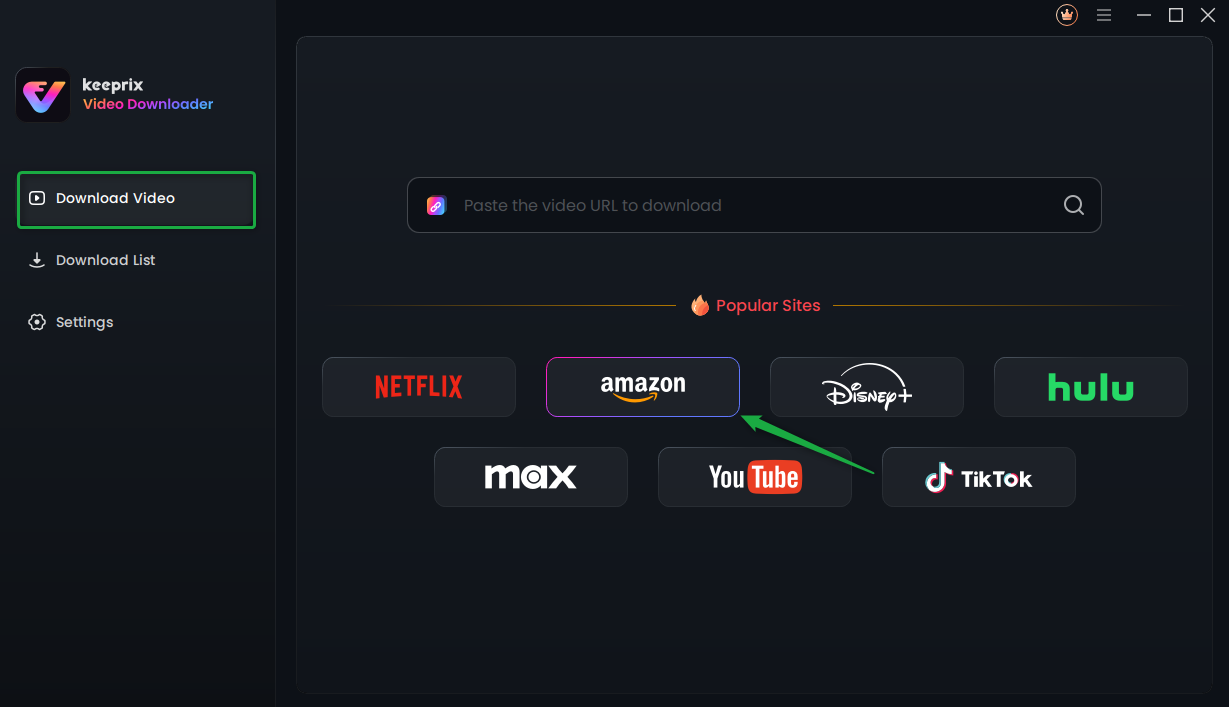
Choose Amazon Platform
Step 2. Access Amazon Prime Video: Click the Amazon icon within the Keeprix Video Downloader built-in browser. Log in to your Amazon account if prompted (this is safe; it allows the software to access the catalog).
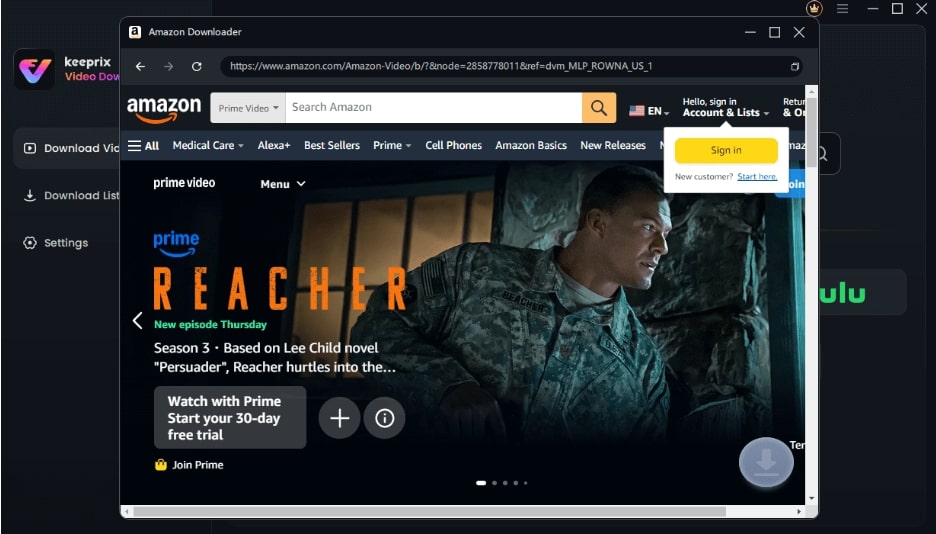
Sign Into Prime Account
Step 3. Select Your Video: Navigate to the Amazon Prime Video section and play the episode you wish to download.
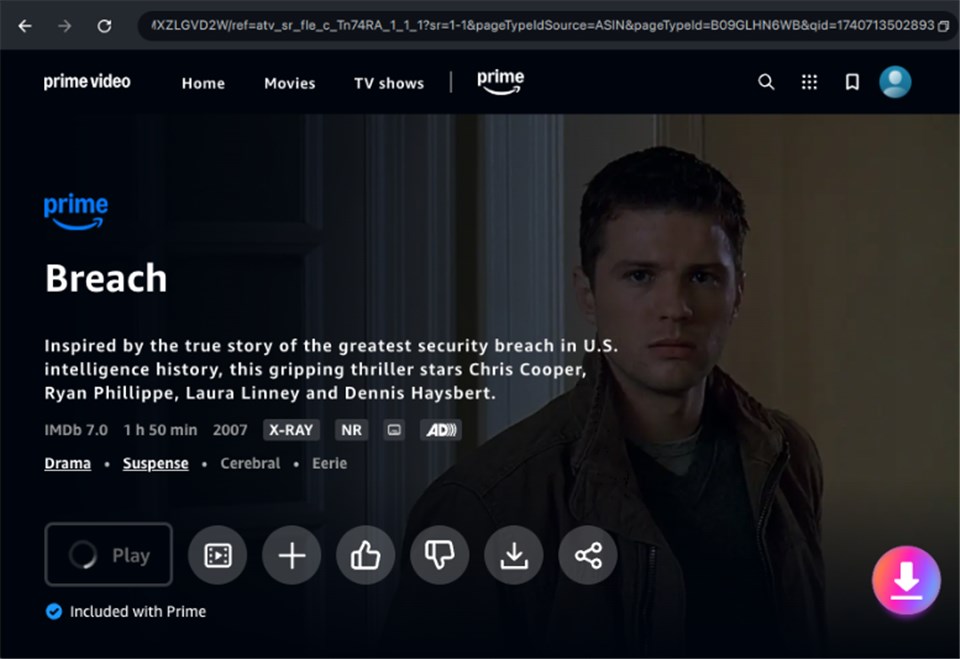
Download Amazon Videos
Step 4. Analyze and Queue: The software will automatically detect the video stream. A pop-up will appear asking for your preferred resolution (e.g., 1080p, 720p). Select your quality and click Download Now.
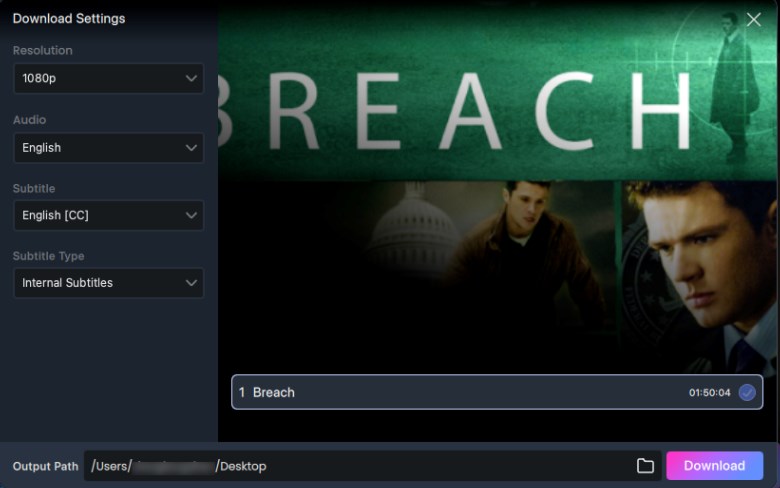
Adjust Download Settings
Keeprix Video Downloader does not support downloading Amazon MiniTV content. It only works with Amazon Prime Video.
Bridging the Gap: How to Transfer to Mobile for Commuting
Since Arjun needs these files on his phone for the metro ride, downloading them to a laptop is only half the battle. Because the files are standard MP4s, you can easily move them to your mobile device.
Here is how to bridge the gap between your PC and your phone:
For Android Users (USB Method – Recommended):
- Connect your phone to the PC using a USB-C data cable.
- On your phone notification shade, select “File Transfer / Android Auto.”
- On your PC, copy the downloaded MP4 files from the Keeprix Video Downloaderoutput folder.
- Paste them into your phone’s “Movies” or “Download” folder.
- Play using any media player like VLC or MX Player.
For iOS Users (iTunes/Finder):
- Connect your iPhone to your Mac or PC.
- Open Finder (Mac) or iTunes (PC).
- Drag and drop the MP4 files into a file-sharing app interface (like VLC for iOS).
- Open the VLC app on your iPhone to watch offline.
Wireless Method (Any Device):
If you have a strong local Wi-Fi connection at home, use a service like LocalSend or AirDrop (Mac to iPhone only) to beam the file to your phone without cables.
Amazon MiniTV vs. Prime Video: Understanding the Differences
A major source of frustration stems from the confusing difference between Prime Video (offline allowed) and MiniTV (offline not allowed). Since both services are accessed via Amazon, users logically expect similar features. However, they operate under entirely different rules regarding Mini TV content rules.
- Amazon Prime Video (SVOD): You pay a subscription fee. That payment buys you the right to watch ad-free and download content for offline viewing. The download feature is a “paid perk.”
- Amazon MiniTV (AVOD): This service is completely free but monetized only by ads. There is no subscription tier to remove ads or enable downloads.
Recognizing this distinction helps manage expectations. If you are looking for an Amazon Mini TV offline download feature natively, you are looking for a feature that contradicts the service’s core business model.
Frequently Asked Questions About MiniTV Downloads
Q1. Can I download Amazon MiniTV videos directly to my phone?
No, the official app does not provide a native download button. To get video files on your phone, you must download them on a computer using software like Keeprix Video Downloader and then transfer the files via USB or Wi-Fi.
Q2. Is Keeprix Video Downloader free?
Keeprix Video Downloader is paid software that typically offers a limited free trial (e.g., 3 downloads) so you can verify it works. To use it for a full series, you will need to purchase a license.
Q3. Is it legal to download MiniTV videos with third-party apps?
Downloading content violates Amazon’s Terms of Service, which stipulate that content is for streaming only. However, in many jurisdictions, downloading copyrighted content for personal, non-commercial use (time-shifting) falls into a legal gray area. Always check your local regulations regarding how to save Mini TV videos and copyright.
Q4. Does MiniTV support offline mode on Android or iOS?
No. Whether you are using the standalone app or the Mini TV phone app integrated into Amazon Shopping, there is no official Amazon MiniTV offline mode.
Q5. Why does screen recording not work on MiniTV?
Attempts to use screen recorders fail due to Mini TV DRM protection. The app detects the recording software and blacks out the video feed to protect the copyright of the content.
Conclusion
The search for how to download Amazon MiniTV video content often leads to frustration because the platform’s model strictly enforces online streaming. Users like Arjun, who simply want to watch their favorite web series during a commute, are left with few official options beyond data-saving settings.
However, you do not have to accept a “streaming only” restriction if you are willing to use a desktop workaround. By using a tool like Keeprix Video Downloader to download Prime videos on your computer and transferring the files to your phone, you can build an offline library free of ads and buffering. While it requires a few extra steps compared to Prime Video, it remains the most reliable method for true offline access in 2025.